
AI demos are easy to make look impressive on day one.
But once you try to use them in a real backend, the problems show up fast: irrelevant retrieval, bloated prompts, slow responses, rising costs, and answers that feel inconsistent or fragile.
That is exactly why Retrieval-Augmented Generation (RAG) still matters in 2026.
A solid RAG backend does not just call an LLM and hope for the best. It retrieves the right context, structures the prompt correctly, reduces unnecessary tokens, and adds enough control to make the system more useful in production.
In this guide, you will learn how to build a RAG backend in Java with Spring AI step by step. We will cover the full flow: document preparation, chunking, embeddings, retrieval, prompt construction, and caching. We will also look at common mistakes that make many Java AI backends unreliable in production.
If you are a Java developer, backend engineer, or software architect exploring AI integration, this tutorial will give you a practical mental model you can actually use.
Download the Java AI PR Review Pack (2026)
A practical resource to review Java AI pull requests faster and catch real backend issues before production:
https://prodevaihub.com/java-ai-pr-review-pack/
Join the newsletter
Get practical Java, AI, backend, and productivity content delivered to your inbox:
https://prodevaihub.com/newsletter
What Is a RAG Backend in Java?
A RAG backend is a backend service that retrieves relevant information before sending a request to the model.
Instead of asking the AI model to answer only from its internal knowledge, you enrich the prompt with selected content from your own documents, knowledge base, internal pages, support articles, technical references, or structured business data.
In simple terms, the flow looks like this:
- your application receives a question
- the backend searches for the most relevant content
- that content is added to the prompt
- the model generates an answer grounded in retrieved context
This is especially useful when you want the model to answer based on specific, updated, or domain-relevant data.
For Java teams, RAG is often one of the most practical ways to add AI to an existing backend without building a fully autonomous AI system. It gives you a clearer architecture, more control over the source context, and a better chance of producing answers that are actually useful to users.
Why RAG Still Matters in 2026
RAG still matters because most production AI systems still face the same core problems:
- models can hallucinate
- business knowledge changes over time
- prompts become too large and too expensive
- users expect answers tied to real internal content
- teams need systems that are reviewable and maintainable
A backend that retrieves the right context before generation is usually easier to reason about than a backend that just sends long user prompts and hopes the model will figure everything out.
When RAG Is Better Than Sending More Raw Context
A common mistake is to keep stuffing more text into the prompt whenever answer quality drops.
That approach usually breaks down for three reasons:
- it increases latency and token cost
- it makes prompts harder to control
- it often sends irrelevant information alongside useful information
RAG is better when you want your backend to retrieve only the most relevant chunks for each query instead of sending everything all the time.
That does not mean RAG solves everything automatically. It means you have a better architectural pattern for grounding answers in context.
The Architecture We’re Building
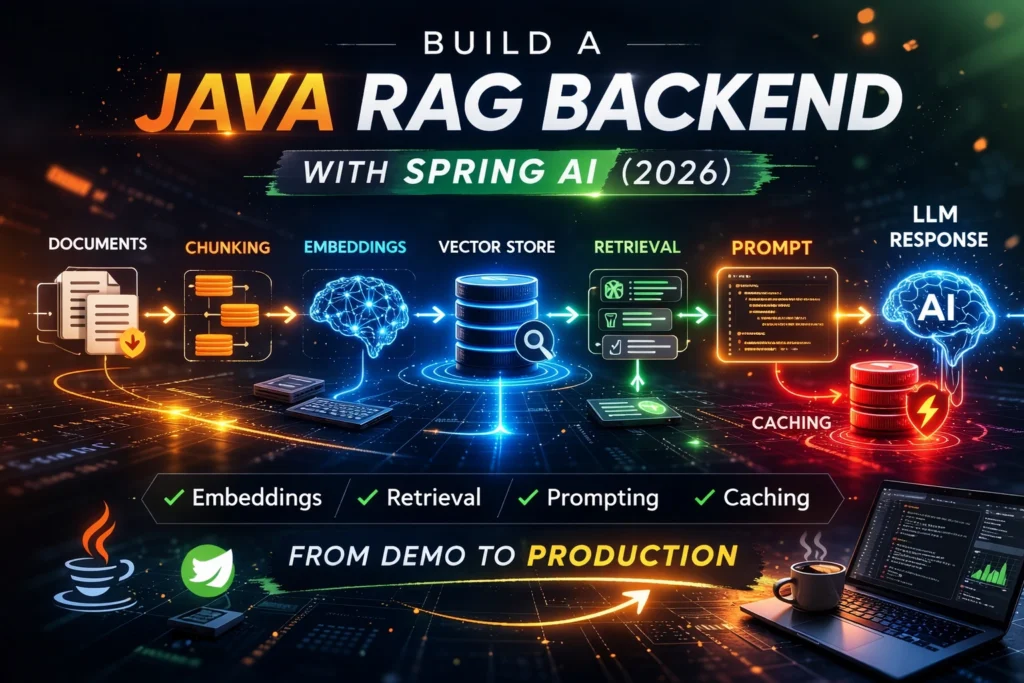
A production-minded RAG backend in Java usually follows a pipeline like this:
- documents enter the system
- documents are cleaned and chunked
- chunks are embedded
- embeddings are stored in a vector store
- the user query is embedded
- the backend retrieves relevant chunks
- the backend builds the prompt
- the model generates the answer
- caching reduces repeated work, cost, and latency
That pipeline may sound simple at first, but each step affects quality.
If chunking is bad, retrieval quality drops.
If retrieval is weak, the prompt becomes weak.
If the prompt is overloaded, latency and cost rise.
If caching is missing, the system keeps doing expensive work again and again.
A strong Java RAG backend is not just about “using embeddings.” It is about designing the entire flow carefully.
Prerequisites and Stack
Before you start, you do not need a huge AI platform.
You need a clear backend mindset and a practical stack.
For this tutorial, the mental stack is:
- Java
- Spring Boot
- Spring AI
- an embedding model
- a chat model
- a vector store
- a caching layer
- logs and observability
Why Spring AI for This Tutorial
Spring AI is a good fit for Java developers who already work in the Spring ecosystem and want a familiar way to integrate AI patterns into backend services.
If your team already uses Spring Boot, Spring configuration, dependency injection, and modular backend design, Spring AI feels like a natural extension of your stack.
That does not mean other options are bad. LangChain4j is also a strong alternative. But for this tutorial, the goal is to stay close to a Spring-native workflow that many Java teams can adopt more easily.
What You Should Already Know
This guide will be easier to follow if you already understand:
- basic Spring Boot backend structure
- REST APIs
- DTOs and services
- logging and configuration
- the difference between storage and retrieval
You do not need to be an AI expert. But you do need to think like a backend engineer, not like someone building a quick demo.
Step 1: Prepare and Chunk Your Documents
This is where many RAG tutorials fail.
They jump straight to embeddings and vector stores without giving enough attention to document preparation. But bad documents create bad chunks, and bad chunks create weak retrieval.
If the retrieved context is poor, the final answer will also be poor.
Why Chunking Matters More Than Most Tutorials Admit
The model never sees “your whole document” in a smart, magical way.
It sees chunks.
That means your system quality depends heavily on how those chunks are created.
If chunks are too large, you may retrieve too much irrelevant content.
If chunks are too small, you may lose important context.
If chunks split ideas in the wrong place, retrieval becomes noisy and less reliable.
Chunking is not just a preprocessing detail. It is one of the most important quality decisions in a RAG backend.
Chunk Size and Overlap
There is no universal perfect chunk size.
A good chunking strategy depends on the type of content:
- API docs
- FAQs
- technical guides
- legal text
- support articles
- code-related documentation
In general, you want chunks that are large enough to preserve meaning, but small enough to stay focused.
Overlap can help preserve continuity between chunks, especially when ideas span multiple paragraphs. But too much overlap also increases redundancy and storage size.
The goal is not to pick random numbers and hope for the best. The goal is to preserve semantic meaning while keeping retrieval precise.
Metadata to Attach to Each Chunk
Metadata is one of the most overlooked parts of RAG design.
A chunk should not just contain text. It should also carry useful metadata such as:
- source document name
- section title
- product or domain
- last updated date
- language
- category
- internal tags
- permissions or visibility rules
Metadata helps you filter results and keep retrieval more relevant.
For example, if a user asks about billing, your backend should ideally avoid retrieving chunks from unrelated security documentation. Metadata gives you that control.
Common Chunking Mistakes
Here are some of the most common chunking mistakes:
- embedding raw files without cleaning them
- splitting text purely by character count without respecting meaning
- ignoring headings and section boundaries
- storing chunks with no metadata
- mixing unrelated topics into one chunk
- keeping obsolete or duplicated content in the corpus
If your chunks are messy, your retrieval layer will have to work much harder, and even then the results may still be weak.
Step 2: Generate Embeddings and Store Them
Once your documents are chunked, the next step is to generate embeddings.
Embeddings convert text into vector representations that make semantic comparison possible. That means the system can retrieve content based on meaning, not just exact keyword matches.
What Embeddings Actually Do
Embeddings do not summarize the document.
They do not generate answers.
They do not decide what the model should say.
Their role is to represent text in a way that makes similarity search possible.
If a user asks a question, the backend can compare the query embedding to stored chunk embeddings and retrieve the most relevant chunks.
That is what gives RAG its retrieval capability.
How Indexing Works
Indexing is the process of taking your prepared chunks, generating embeddings for them, and storing both the text and vector representation in a retrievable structure.
At indexing time, you are essentially preparing your knowledge base for future queries.
This is not the same as runtime generation. It is a preparation stage that shapes how effective your system will be later.
What a Vector Store Is Responsible For
A vector store is responsible for storing embeddings and enabling similarity-based retrieval.
It lets you ask questions like:
- which chunks are closest to this query?
- which chunks match this semantic meaning?
- which relevant chunks also satisfy metadata filters?
That makes it a core part of the RAG pipeline.
What a Vector Store Does Not Do
A vector store does not automatically fix bad data.
It does not create a good chunking strategy.
It does not guarantee relevance.
It does not protect you from prompt bloat.
It does not know which answer is best for your business use case.
Many teams overestimate the vector store and underestimate the rest of the pipeline.
The truth is simple: a vector store helps retrieval, but the quality of retrieval still depends on the quality of the chunks, metadata, filters, and prompt assembly around it.
Step 3: Retrieve the Right Context
This is where your RAG backend starts to feel intelligent or disappointing.
Retrieval is the bridge between stored knowledge and the final answer.
Similarity Search Basics
At query time, the user question is embedded. The system then searches for the closest chunk vectors in the vector store.
That gives you a first set of candidate chunks.
At a high level, this sounds easy. But in practice, relevance is fragile.
A chunk can be semantically similar without being useful.
A technically correct chunk can still be too broad.
A top-ranked chunk can still miss the exact business context the user needs.
That is why retrieval should not be treated as a blind “top-k and done” step.
Why Top-K Is Not Enough by Itself
A common beginner approach is:
- retrieve the top 5 chunks
- add them to the prompt
- send the request to the model
That can work in a demo. But it often fails in production.
Why?
Because top-k alone does not answer questions like:
- are these chunks actually relevant enough?
- are they redundant?
- do they belong to the right domain?
- are they recent enough?
- do they conflict with each other?
A good backend often needs more than raw similarity. It may need filtering, ranking logic, or fallback behavior when the retrieved context is weak.
Metadata Filtering
This is where metadata becomes powerful.
You can filter retrieval by:
- product
- tenant
- document type
- language
- internal source
- recency
- access scope
This improves relevance and reduces noise.
Instead of searching your entire corpus blindly, your backend can narrow the search space before passing the results to the model.
That usually improves both answer quality and prompt efficiency.
How Bad Retrieval Ruins Good Prompts
A lot of people blame prompt design when answer quality is weak.
But sometimes the prompt is not the real problem.
If the retrieved chunks are noisy, outdated, irrelevant, or too broad, even a well-structured prompt will struggle.
Prompt quality matters. But good prompting cannot fully rescue poor retrieval.
In RAG, retrieval discipline comes first.
Step 4: Build the Prompt Correctly
Once you have the right context, you still need to package it correctly.
This is where the backend moves from retrieval into controlled generation.
System Prompt vs User Input vs Retrieved Context
A clean RAG prompt usually contains three layers:
- a system instruction
- the user’s question
- the retrieved context
Each part has a different purpose.
The system prompt defines behavior and constraints.
The user message carries the actual intent.
The retrieved context grounds the answer in relevant material.
If you blur these layers together, the prompt becomes harder to reason about and harder to review.
How Much Context Should You Include?
More context is not always better.
A common anti-pattern is to keep adding more chunks because “more information should help.”
But too much context creates problems:
- higher latency
- more token usage
- more noise
- weaker focus
- higher chance that important details get buried
Your goal is not to send the largest possible prompt.
Your goal is to send the most relevant possible prompt.
That means choosing context deliberately.
Prompt Template Example
A strong RAG backend usually follows a repeatable prompt structure.
For example, your prompt logic may tell the model:
- answer based on the retrieved context
- do not invent unsupported details
- say when the answer is uncertain
- prioritize concise, grounded output
- keep domain terminology consistent
The exact wording can vary, but the principle stays the same: the prompt should reinforce the retrieval strategy, not fight it.
What to Do When Retrieval Is Weak
A production backend should not assume retrieval always succeeds.
Sometimes the retrieved chunks are too weak, too broad, or too uncertain.
In those cases, your system should have fallback behavior.
Examples include:
- returning a limited answer
- asking a clarifying question
- admitting low confidence
- refusing to answer outside retrieved evidence
- triggering another retrieval path
This is one of the biggest differences between a demo and a production-oriented design.
Step 5: Add Caching to Reduce Latency and Cost
Caching is one of the most practical upgrades you can add to a RAG backend.
It helps reduce repeated work, improve responsiveness, and control cost.
Yet many RAG tutorials barely mention it.
What to Cache in a RAG Backend
Not everything should be cached the same way.
Possible cache targets include:
- repeated query normalization results
- retrieval results for common requests
- prompt assembly artifacts
- final responses for stable use cases
- document processing outputs during ingestion
The best caching strategy depends on the use case, freshness requirements, and tolerance for stale data.
Query Cache vs Retrieval Cache vs Response Cache
These are not the same.
A query cache may help if users ask the same or very similar questions repeatedly.
A retrieval cache may help when the retrieval layer is expensive and stable enough to reuse for a short period.
A response cache may help for highly repetitive use cases where the final answer does not need to be regenerated each time.
Each cache layer has different trade-offs.
When Caching Helps
Caching is especially useful when:
- users repeat similar questions
- retrieval is costly
- latency matters
- data freshness does not change every second
- prompt construction is expensive
- model calls are the main cost driver
In many enterprise or internal assistant scenarios, caching can create meaningful gains quickly.
When Caching Becomes Risky
Caching can also become dangerous if you use it carelessly.
Examples:
- serving stale answers after documents changed
- caching responses that depend on permissions
- reusing context across tenants incorrectly
- hiding retrieval problems behind old cached outputs
- failing to invalidate caches when the data changes
Caching should reduce waste, not reduce trust.
Step 6: Common RAG Mistakes Java Teams Make
This is where many systems become harder to maintain than expected.
Here are some of the most common mistakes I see in Java AI backend design.
1. Embedding Bad Chunks
If the source chunks are noisy, outdated, duplicated, or poorly segmented, retrieval quality will suffer from the beginning.
2. Retrieving Too Much Context
Teams often send too many chunks into the prompt. That increases cost and weakens focus.
3. Prompt Stuffing
Some systems try to compensate for weak retrieval by writing huge prompts full of instructions and extra context. That usually creates slower, more fragile behavior.
4. Ignoring Metadata
Without metadata, the system has fewer ways to narrow the search space and filter irrelevant content.
5. No Cache Strategy
The backend keeps repeating expensive work because no one designed caching intentionally.
6. No Observability
If you cannot inspect retrieval quality, chunk usage, latency, or model behavior, debugging becomes painful.
7. No Fallback When Retrieval Is Weak
A lot of demos assume the model should always answer. Production systems need better judgment than that.
Reviewing Java AI pull requests? Download the Java AI PR Review Pack (2026) to catch weak retrieval, prompt bloat, missing guardrails, and other backend issues before they hit production.
https://prodevaihub.com/java-ai-pr-review-pack/
Minimal Java RAG Backend Flow
Let’s simplify the logic into two main backend paths: ingestion flow and query flow.
Document Ingestion Flow
The ingestion flow usually looks like this:
- load source documents
- clean and normalize text
- split content into chunks
- attach metadata
- generate embeddings
- store chunks and vectors
This is the phase where you prepare the knowledge base.
Query Flow
The query flow usually looks like this:
- receive the user question
- normalize or enrich the query if needed
- embed the query
- retrieve the most relevant chunks
- filter or rank results
- assemble the prompt
- call the chat model
- return the answer
- cache appropriate artifacts if useful
This is the runtime path that determines user experience.
Where Caching Fits
Caching can fit in both flows.
In ingestion, you may cache expensive processing steps or avoid re-indexing unchanged content.
In query execution, you may cache retrieval results, prompt structures, or stable responses depending on the business scenario.
Where Observability Fits
Observability should not be added at the end as an afterthought.
You want visibility into:
- which chunks were retrieved
- how long retrieval took
- how many tokens were sent
- which prompts were assembled
- where latency accumulated
- when answers were weak or uncertain
If your system starts underperforming, these signals become essential.
How to Make a RAG Backend Production-Ready
A working demo is not the same as a production backend.
To move toward production readiness, think in terms of reliability, maintainability, and reviewability.
Logging and Tracing
You need enough logs and traces to understand how the backend behaves under real traffic.
At minimum, you should be able to inspect retrieval paths, chunk selection, prompt assembly timing, and model call timing.
Evaluation and Quality Checks
Teams often deploy AI features with too little evaluation.
At a minimum, you should test:
- whether retrieval returns the right domain content
- whether answers stay grounded in the retrieved material
- whether the system handles ambiguity well
- whether the system avoids unsupported claims
Evaluation does not have to be huge at first, but it should exist.
Latency Monitoring
Latency becomes more visible once real users start interacting with the system.
You want to know whether slowness comes from:
- document retrieval
- embedding generation
- prompt assembly
- external model calls
- serialization or backend overhead
Without that visibility, optimization becomes guesswork.
Cost Control
AI cost usually grows through repeated waste:
- oversized prompts
- repeated retrieval
- no caching
- unnecessary regeneration
- badly scoped queries
A well-designed RAG backend is often cheaper not because the model is cheaper, but because the backend is more disciplined.
Basic Security Concerns
Even a simple RAG backend should think about security.
At minimum, consider:
- access control for retrieved content
- tenant isolation
- prompt injection exposure
- sensitive data handling
- source filtering
- response behavior under uncertain context
If the backend retrieves the wrong content, the model can expose the wrong information. That is a backend problem, not only a prompt problem.
Spring AI vs LangChain4j for RAG
Java developers often ask which framework they should choose.
The answer depends less on hype and more on team fit.
Why This Tutorial Uses Spring AI
If your team already uses Spring Boot, Spring configuration, and Spring-style service design, Spring AI gives you a familiar mental model.
That can reduce friction and help your team move faster.
When LangChain4j May Be a Better Fit
LangChain4j can still be a good choice if your team prefers its abstractions, patterns, or developer experience.
The real goal is not to choose the “coolest” framework.
It is to choose the one your team can ship and maintain confidently.
The Practical Decision Rule for Java Teams
Use the framework that fits:
- your existing stack
- your team’s review habits
- your observability needs
- your deployment model
- your speed of delivery
Most teams do better with a boring, maintainable choice than with a trendy but awkward one.
Final Checklist: From Demo to Production
Before calling your Java RAG backend production-ready, check whether you have the following:
- a clear chunking strategy
- meaningful metadata on chunks
- reliable embeddings and indexing
- tuned retrieval logic
- a prompt template that stays focused
- a cache strategy
- observability for retrieval and latency
- fallback behavior when retrieval is weak
- a plan for access control and data safety
- a way to evaluate answer quality over time
If several of these are missing, the system may still work, but it is likely to feel fragile under real usage.
Conclusion
A strong RAG backend in Java is not just about connecting an LLM to a vector store.
The real difference comes from the quality of your chunking, the discipline of your retrieval, the structure of your prompt, and the intelligence of your caching strategy.
That is what separates a flashy demo from a backend that remains useful in production.
If you want to build Java AI systems that are easier to maintain, easier to review, and more grounded in real context, start by getting the backend architecture right.
Download the Java AI PR Review Pack (2026)
A practical resource to review Java AI pull requests faster and catch real backend issues before production:
https://prodevaihub.com/java-ai-pr-review-pack/
Get the book
Read the book for practical strategies to grow your tech career and build leverage with AI:
https://prodevaihub.com/book/
Join the newsletter
Get practical Java, AI, backend, and productivity content delivered to your inbox:
https://prodevaihub.com/newsletter
Watch the full walkthrough on YouTube
Follow ProDev AIHub for more Java + AI backend content:
https://www.youtube.com/@ProDevAIHub
FAQ
What is a RAG backend in Java?
A RAG backend in Java is a backend service that retrieves relevant documents or chunks, adds them to the prompt, and sends that enriched prompt to an AI model to generate more grounded answers.
How do embeddings work in a Java RAG application?
Embeddings convert text into vector representations so the system can compare semantic similarity and retrieve the most relevant chunks for a user query.
What is the role of a vector store in RAG?
A vector store keeps embedded chunks and allows the backend to retrieve the closest matches for a query using similarity search.
How do you improve retrieval quality in a RAG backend?
You improve retrieval quality with better chunking, useful metadata, stronger filtering, tuned top-k values, cleaner documents, and more disciplined prompt assembly.
Why do RAG applications become slow in production?
They often become slow because of poor chunking, too much retrieved context, oversized prompts, repeated embedding work, no caching strategy, and expensive model calls.
Should Java developers use Spring AI or LangChain4j for RAG?
It depends on the team’s stack and priorities, but Spring AI is often a strong fit for Spring Boot teams that want a familiar integration model, while LangChain4j can still be a solid choice for teams that prefer its approach.