
State management has always been one of the most debated topics in Angular.
For years, NgRx Store was the default answer for anything non-trivial.
Then Angular Signals arrived — and suddenly, many teams started asking:
Do we still need NgRx in 2026?
The short answer is: yes — sometimes.
This guide will help you choose the right tool based on context, not trends.
🎥 Prefer watching instead of reading?
I also published a full YouTube video where I explain when to use Angular Signals vs NgRx Store in 2026, with real-world examples and a clear decision framework.
👉 Watch the full video on YouTube:
Why State Management Is Still a Problem in Angular
Most Angular applications don’t fail because of missing features.
They fail because of unnecessary complexity.
Common patterns still seen in 2026:
- Global state for local UI problems
- Heavy architectures for simple apps
- Tool-driven decisions instead of problem-driven ones
State itself isn’t the issue.
Choosing the wrong level of abstraction is.
What Are Angular Signals?
Definition (what Signals are)
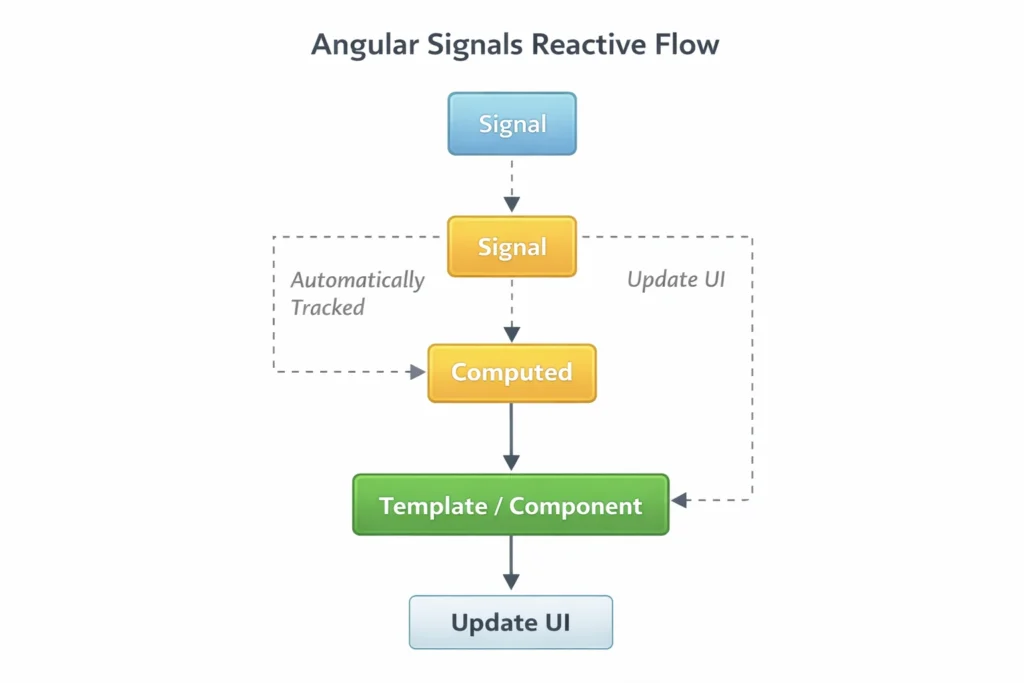
Angular Signals are a built-in reactive primitive in Angular that represents a tracked value.
When a Signal changes, Angular automatically updates any computed values and UI that depend on it.
A Signal-based model is:
- synchronous (updates happen immediately)
- dependency-tracked (Angular knows what depends on what)
- fine-grained (updates only the parts that need updating)
What problem Signals solve
Signals reduce the need to use RxJS for simple state and help avoid:
- complex subscription chains
- unnecessary async pipelines
- hard-to-read component state
Code example: Signals for local UI state
Example: a simple list filter + derived state.
import { Component, computed, signal } from '@angular/core';

type User = { id: number; name: string; active: boolean };

@Component({
  selector: 'app-users',
  template: `
    <h2>Users</h2>

    <input
      type="text"
      [value]="query()"
      (input)="query.set(($any($event.target).value))"
      placeholder="Search users..."
    />

    <button (click)="showActiveOnly.update(v => !v)">
      Active only: {{ showActiveOnly() ? 'ON' : 'OFF' }}
    </button>

    <p>Showing {{ filteredUsers().length }} users</p>

    <ul>
      <li *ngFor="let u of filteredUsers()">
        {{ u.name }} <span *ngIf="u.active">✅</span>
      </li>
    </ul>
  `
})
export class UsersComponent {
  // Local state
  query = signal('');
  showActiveOnly = signal(false);

  users = signal<User[]>([
    { id: 1, name: 'Alice', active: true },
    { id: 2, name: 'Bob', active: false },
    { id: 3, name: 'Charlie', active: true }
  ]);

  // Derived state (auto updates when dependencies change)
  filteredUsers = computed(() => {
    const q = this.query().toLowerCase().trim();
    const activeOnly = this.showActiveOnly();

    return this.users()
      .filter(u => (activeOnly ? u.active : true))
      .filter(u => (q ? u.name.toLowerCase().includes(q) : true));
  });
}
Code language: JavaScript (javascript)
Why this is great for Signals:
- minimal boilerplate
- no subscriptions
- derived state is clean and explicit
- perfect for component-level and feature-level state
What Is NgRx Store?
Definition (what NgRx Store is)
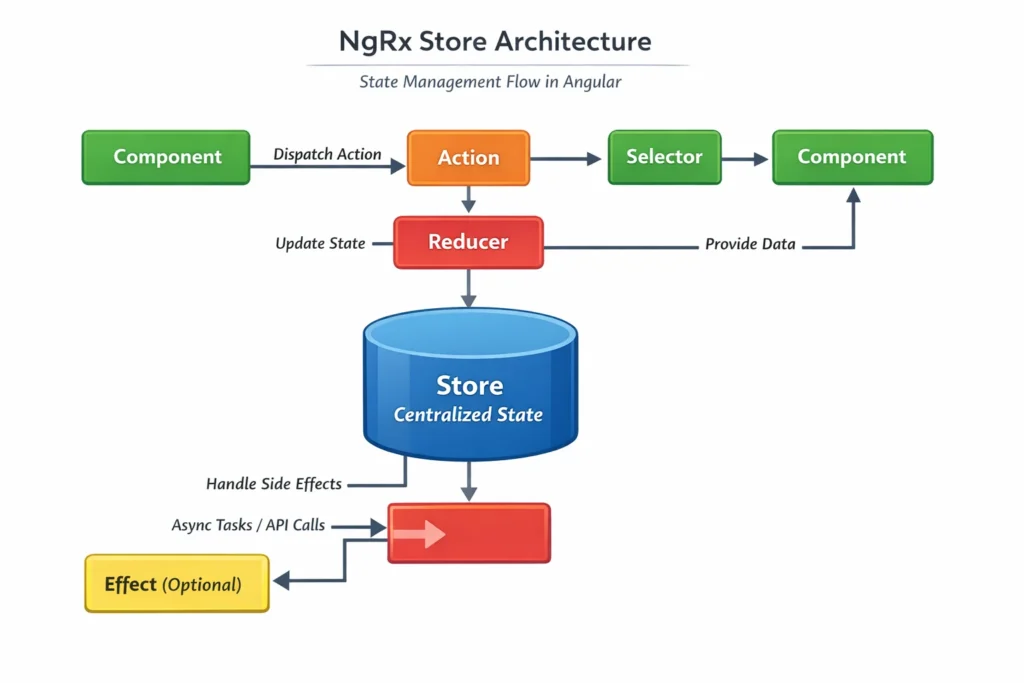
NgRx Store is a state management library for Angular based on the Redux pattern.
It keeps application state in a central store, where state can only change via dispatched actions processed by reducers (pure functions).
NgRx Store is built around:
- Actions (events describing what happened)
- Reducers (pure functions that compute new state)
- Selectors (query functions to read state efficiently)
- Effects (optional side-effects layer for async work)
NgRx is designed for:
- predictable flows
- team scalability
- traceability and debugging
What problem NgRx solves
NgRx is great when you need:
- shared global state across many features
- strict consistency for large teams
- complex workflows and async coordination
- strong debugging (DevTools + action history)
Code example: NgRx Store for global feature state
Example: “Todos” feature with actions, reducer, selector, and component usage.
1) Actions (todos.actions.ts)
import { createAction, props } from '@ngrx/store';

export const loadTodos = createAction('[Todos] Load Todos');
export const loadTodosSuccess = createAction(
  '[Todos] Load Todos Success',
  props<{ todos: { id: number; title: string; done: boolean }[] }>()
);

export const toggleTodo = createAction(
  '[Todos] Toggle Todo',
  props<{ id: number }>()
);
Code language: JavaScript (javascript)
2) State + Reducer (todos.reducer.ts)
import { createReducer, on } from '@ngrx/store';
import * as TodosActions from './todos.actions';

export type Todo = { id: number; title: string; done: boolean };

export interface TodosState {
  todos: Todo[];
  loaded: boolean;
}

export const initialState: TodosState = {
  todos: [],
  loaded: false
};

export const todosReducer = createReducer(
  initialState,

  on(TodosActions.loadTodosSuccess, (state, { todos }) => ({
    ...state,
    todos,
    loaded: true
  })),

  on(TodosActions.toggleTodo, (state, { id }) => ({
    ...state,
    todos: state.todos.map(t =>
      t.id === id ? { ...t, done: !t.done } : t
    )
  }))
);
Code language: JavaScript (javascript)
3) Selectors (todos.selectors.ts)
import { createFeatureSelector, createSelector } from '@ngrx/store';
import { TodosState } from './todos.reducer';

export const selectTodosState =
  createFeatureSelector<TodosState>('todos');

export const selectTodos =
  createSelector(selectTodosState, s => s.todos);

export const selectOpenTodos =
  createSelector(selectTodos, todos => todos.filter(t => !t.done));
Code language: JavaScript (javascript)
4) Component usage (todos.component.ts)
import { Component } from '@angular/core';
import { Store } from '@ngrx/store';
import * as TodosActions from './state/todos.actions';
import * as TodosSelectors from './state/todos.selectors';

@Component({
  selector: 'app-todos',
  template: `
    <h2>Todos</h2>

    <button (click)="reload()">Reload</button>

    <ul>
      <li *ngFor="let t of todos$ | async">
        <label>
          <input
            type="checkbox"
            [checked]="t.done"
            (change)="toggle(t.id)"
          />
          {{ t.title }}
        </label>
      </li>
    </ul>
  `
})
export class TodosComponent {
  todos$ = this.store.select(TodosSelectors.selectTodos);

  constructor(private store: Store) {
    this.store.dispatch(TodosActions.loadTodos());
  }

  reload() {
    this.store.dispatch(TodosActions.loadTodos());
  }

  toggle(id: number) {
    this.store.dispatch(TodosActions.toggleTodo({ id }));
  }
}
Code language: JavaScript (javascript)
Why this is great for NgRx:
- every state change is explicit (actions)
- reducers are predictable
- selectors scale well
- teams can collaborate safely
- debugging is excellent
(In a real app, you’d typically add Effects for async loading.)
Angular Signals vs NgRx Store (Side-by-Side Comparison)
| Aspect | Angular Signals | NgRx Store |
|---|---|---|
| Core idea | tracked reactive values | centralized store + actions/reducers |
| Boilerplate | minimal | significant |
| Best scope | local/feature state | global/business state |
| Debugging | simple | advanced (DevTools, action history) |
| Team scaling | good | excellent |
| Use when | simplicity + speed | complex flows + traceability |
Decision Framework: Which One Should You Use in 2026?
Use Signals when:
- the state is local (component/feature)
- you want minimal overhead
- you need clean derived state
- you want fast iteration
Use NgRx Store when:
- state is shared across multiple domains/features
- workflows are complex and span many UI parts
- you need strict traceability (especially in big teams)
- you already have an NgRx-heavy codebase
Final Thoughts
Signals don’t replace NgRx.
They replace overengineering.
In 2026, many teams build hybrid architectures:
- Signals for UI/feature state
- NgRx for global workflows and large-team coordination
Choose the tool that fits the problem — not the trend.
If this article helped you clarify when to use Angular Signals vs NgRx Store, you’ll probably get even more value from the video version where everything is explained visually.
👉 Watch the Angular Signals vs NgRx Store (2026) video on YouTube:
https://www.youtube.com/watch?v=S4VcQVPgiN0
Sources & References
- Angular Signals Documentation
- https://angular.dev/guide/signals
- NgRx Official Documentation
- https://ngrx.io